
The Webafrica app puts the important stuff in your pocket.
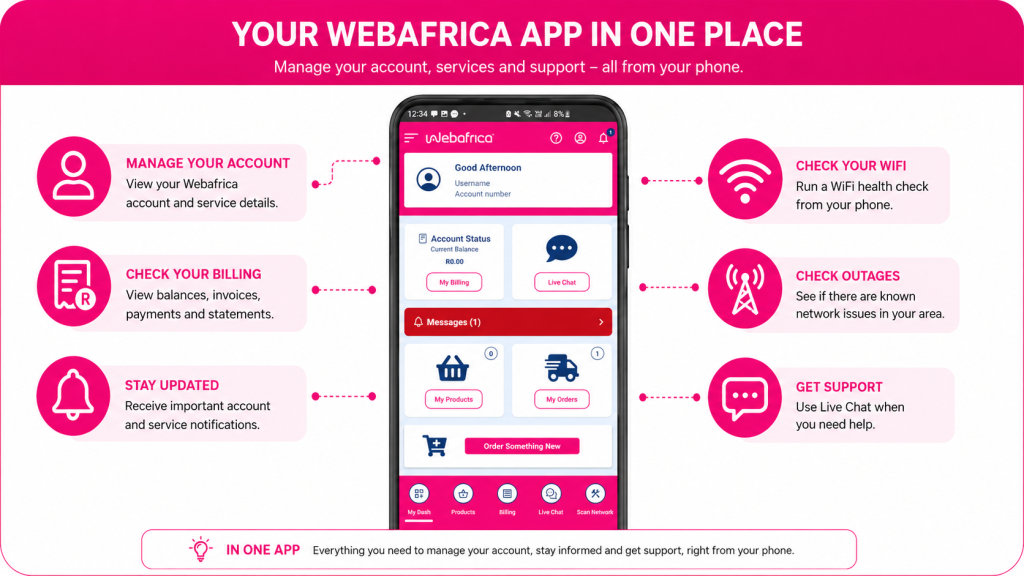
Use it to check your account, manage payments, view your products, follow up on orders, get important updates, run WiFi checks, check for outages, and chat to us when you need help. Nice and easy.
Before you start
Make sure you have the Webafrica mobile app installed and that you are logged in with your Webafrica account details.



Need Help Installing?
Check out our step-by-step guide for your device type:
Once installed, you can log in to manage your account, view your usage, buy data, make payments, and more. All from your phone.
My Dash (Home Screen)
The Home screen is your main app dashboard.
Think of it as your starting point. From here, you can quickly jump into the things customers use most often.
You will see options for:
- Account Status
- Live Chat
- My Products
- My Orders
- Order Something New
Not sure where to go? Start on the Home screen. It usually points you in the right direction.
Billing
Need to check your balance or sort out a payment? Billing is the place to go.
From the Billing section, you can:
- View your current balance
- View and download statements
- Update payment details
- View and download invoices
This is also a good place to check before contacting support about a payment or account balance.
Products
The Products section shows the Webafrica services linked to your account.
Depending on what you have with us, this may include services like Fibre, LTE, VoIP, or other active products.
From here, you can view product details and manage options linked to the service you want to check.
Orders
Waiting for an installation, delivery, or new service update?
Pop into Orders.
This section helps you keep track of orders linked to your account, including new sign-ups, equipment orders, installations, or delivery progress.
Messages and notifications
Messages and Notifications keep you in the loop.
You may see updates about:
- Your account
- Your service
- Billing reminders
- Orders
- Support updates
It is worth checking this section regularly. Sometimes the answer you need is already waiting there, doing its little customer service victory dance.
Network
Having WiFi or connection trouble? Start with a network Health Check.
This tool helps you run a WiFi health check on your phone and identify potential issues with your home WiFi setup.
For best results:
- Connect your phone to your home WiFi
- Stand close to your router when starting the scan
- Allow any permissions the app asks for
- Follow the steps shown in the app
The app may ask for location permission to detect your WiFi network correctly.
Check for outages
Before restarting everything in sight, check if there is an outage in your area.
The app can help you see whether there are known network issues affecting your service.
If there is an outage, keep checking the app for updates. This saves you from troubleshooting something that is already being worked on.
Live Chat
Need help from Webafrica support? Use Live Chat.
Live Chat is useful for help with:
- Your account
- Billing
- Payments
- Your service
- Connection issues
- App support
Before starting a chat, have your account details ready and include a short description of what you need help with. The clearer the info, the quicker we can point you in the right direction.
Try these first before contacting support
If your connection is giving you trouble, try this quick app check first:
- Check for outages – See if there is a known network issue in your area.
- Run a WiFi health check – Scan your network for common issues.
- Use Live Chat – Still stuck? Start a chat with Webafrica support.
Tips for using the app
To get the best out of the Webafrica app:
- Keep the app updated
- Allow notifications so you do not miss important updates
- Check Billing before contacting support about payments
- Check Messages for service or account updates
- Run a WiFi health check before logging a connection issue
- Check for outages before restarting or resetting your router
- Use Live Chat if you still need help
The Webafrica app is there to make managing your service simpler, faster, and a lot less “where do I even start?”