
Update Payment Methods in Your Customer Zone
Need to update your debit order banking details? You can do this quickly through the Webafrica Customer Zone.
-
Log In to the Customer Zone
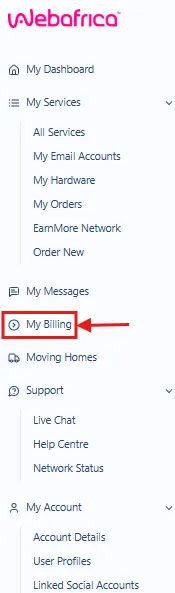
Log in to your Webafrica Customer Zone and navigate to My Billing.
-
In the Payment Details Section
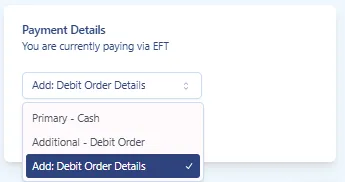
Under Payment Details, click the dropdown menu and select:
Add: Debit Order Details
-
Capture Your Banking Details
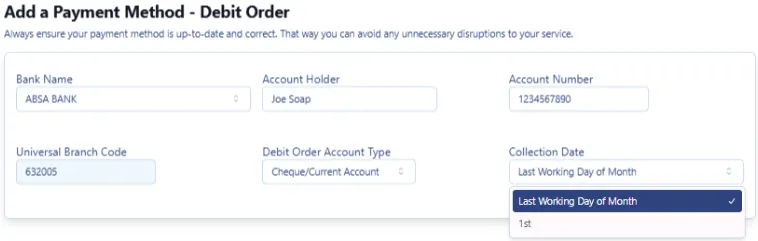
Complete the required fields:
- Bank Name
- Account Holder
- Account Number
- Universal Branch Code
- Debit Order Account Type
- Cheque/Current Account
- Savings Account
- Transmission Account
- Collection Date
- 1st
- Last Working Day of the Month
-
Accept the Debit Order Mandate
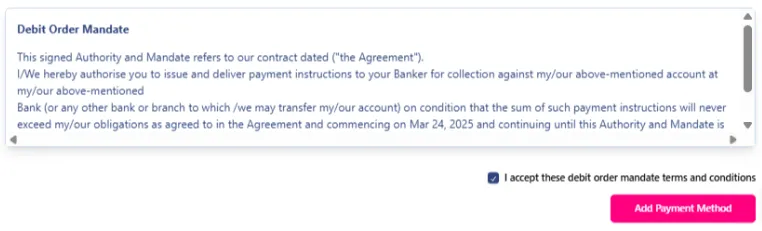
Read through the debit order mandate terms and conditions.
Tick the checkbox to confirm acceptance of the mandate.
-
Save the Payment Method
Click Add Payment Method.
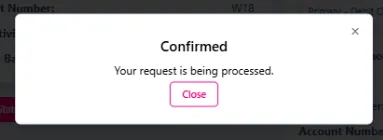
Once submitted, a confirmation message will appear advising that your request is being processed.
Important Information
- Banking details must belong to the authorised account holder.
- Incorrect banking details may result in failed debit orders or service interruptions.
- Updates may take some time to reflect on your account.
- Depending on when the change is made, the update may only apply from the next billing cycle.
Was this article helpful?