
How to Reset Your Customer Zone Password
Forgot your Webafrica Customer Zone password? You can reset it online using the email address, username, or mobile number linked to your account.
Before you start
Make sure you have access to the mobile number linked to your Webafrica account. You may need it to complete the OTP security process.
-
Go to the Webafrica website
Go to:
Select Log In from the top menu.
This will open the Webafrica Customer Zone login page.

-
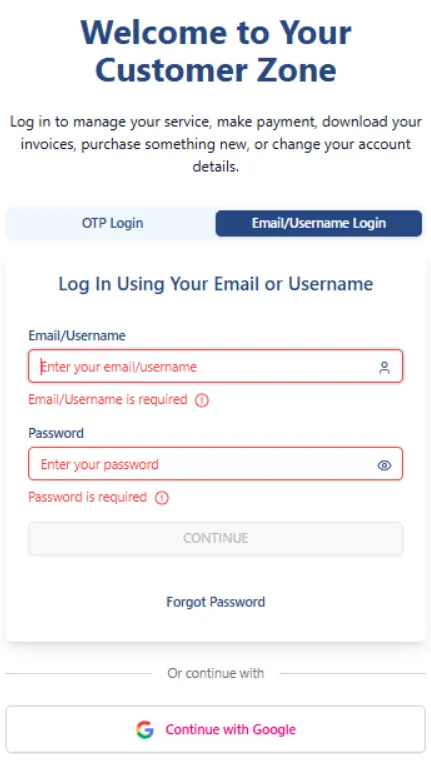
Select Email/Username Login
On the Customer Zone login page, you will see a few login options:
- OTP Login
- Email/Username Login
- Continue with Google, if your account is linked to Google
To reset your password, select Email/Username Login.
-
Select Forgot Password
On the Email/Username Login screen, select Forgot Password.
This will take you to the password recovery page.
-
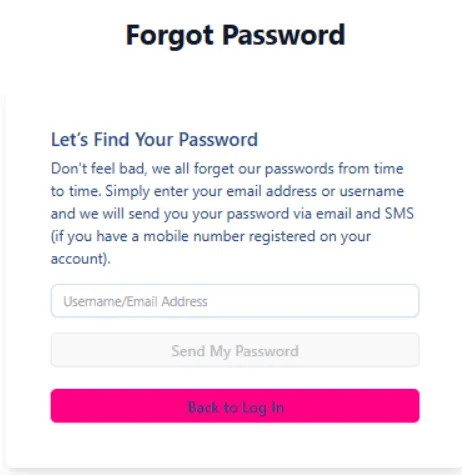
Enter your username or email address
On the Forgot Password page, enter the username or email address linked to your Webafrica account.
Then select Send My Password.
-
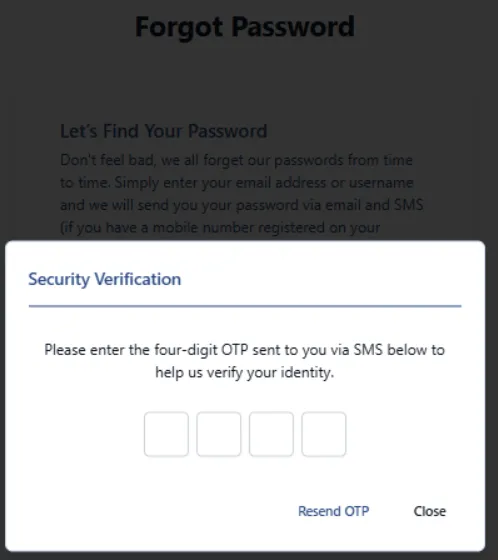
Complete the OTP security check
A security verification pop-up will appear.
Enter the 4-digit OTP sent to the mobile number linked to your account.
If you do not receive the OTP, select Resend OTP.
-
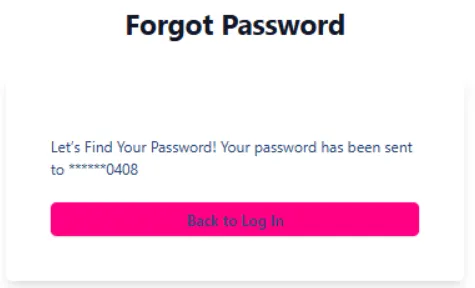
Password sent
Once the OTP is accepted, your password will be sent via SMS to the registered OTP number on your account.
For security, the mobile number will only be partly shown on the screen.
-
Go back and log in
Select Back to Log In.
Then go back to Email/Username Login.
Enter your username or email address and the password you received.
Select Continue to log in.
Important things to know
- Use the email address or username linked to your Webafrica account.
- The OTP is sent to the mobile number registered on your account.
- If your mobile number is outdated, you may not be able to complete the reset online.
- Your Customer Zone password is not the same as your Fibre or Email password.
- Never share your Customer Zone password or OTP with anyone.
Still cannot log in?
If you cannot access your registered mobile number or the password reset does not work, contact Webafrica support via the Live Chat icon at www.webafrica.co.za

You may be asked security questions before changes can be made to your account.
Was this article helpful?