
Unlike our other Fibre services, Vuma Reach does not use a separate router.
Your Vuma Reach ONT, which is the box installed on your wall, connects you to the Fibre network and provides your WiFi connection.
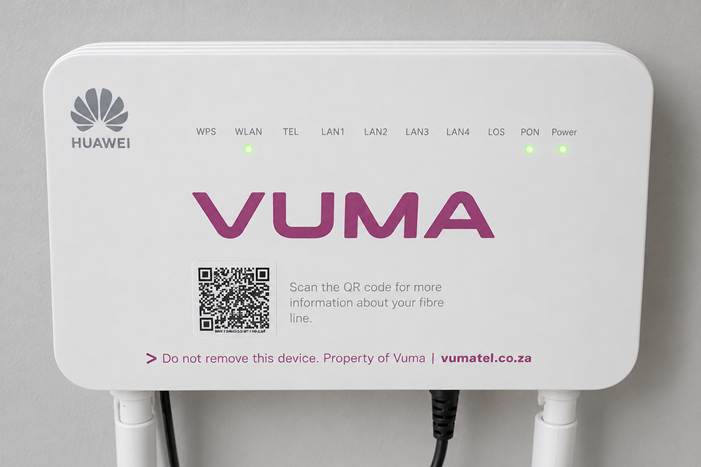
Vuma Reach ONT mounted on a wall
Getting your WiFi details
Once your Vuma Reach service is active, we will send you:
- An SMS containing your WiFi name and password
- A WhatsApp message confirming that your service is active
Keep the SMS somewhere safe, as you will need these details to connect your devices.
You can also view or change your WiFi details using the Webafrica app or Customer Zone.
Connecting your devices
- Open the WiFi settings on your phone, laptop, tablet or other device.
- Select the WiFi name provided in your activation SMS.
- Enter your WiFi password.
- Open a website or app to confirm that you are connected.
Viewing or changing your WiFi details
Using the Webafrica app
- Open the Webafrica app and log in.
- Select My Products from the dashboard.
- Select your Fibre: Vuma Reach service.
- Under WiFi Details, you will see your WiFi Access Point name and password.
- Tap the eye icon to view your password.
- Select Change Password to update it.
Using Customer Zone
- Log in to your Webafrica Customer Zone.
- Go to My Products & Services.
- Find your Vuma Reach service under Included Services.
- Select the gear icon next to your Fibre Prepaid line.
- Open Information to view your WiFi Access Point name.
- Open WiFi Details to view or change your password.
- Select the eye icon to view your current password.
- To change it, enter and confirm your new password, then select Save.
What is the QR code on my ONT?
The QR code on your ONT is labelled:
Scan the QR code for more information about your fibre line
This QR code does not contain your WiFi details.
Scanning it takes you to information about your Fibre line and may also help you resolve account or payment issues. You can scan it using a phone with mobile data when your Fibre connection is offline.
No lights or unable to connect?
When your ONT does not show the expected lights or you cannot connect to the internet, see Vuma Reach: No Internet Connection for troubleshooting steps.