
Whether you need to update the card linked to your Vuma Reach service or simply retry a payment that didn’t go through, you can do it online in just a few minutes.
Update your card details
If you’ve received a new bank card or want to use a different card for future payments:
- Log in to my.webafrica.co.za, or go directly to pay.webafrica.co.za.
- Select Update Card.
- Enter your registered mobile number or email address.
- Enter your new card details.
- Select Save Details and follow the prompts.
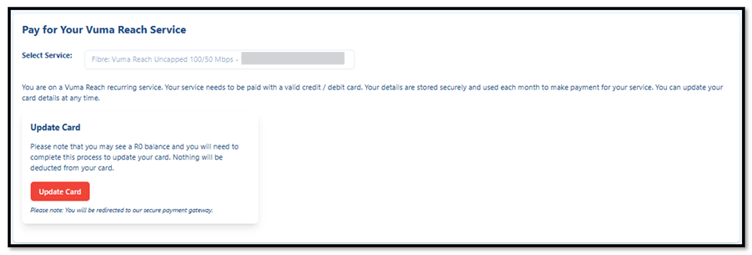
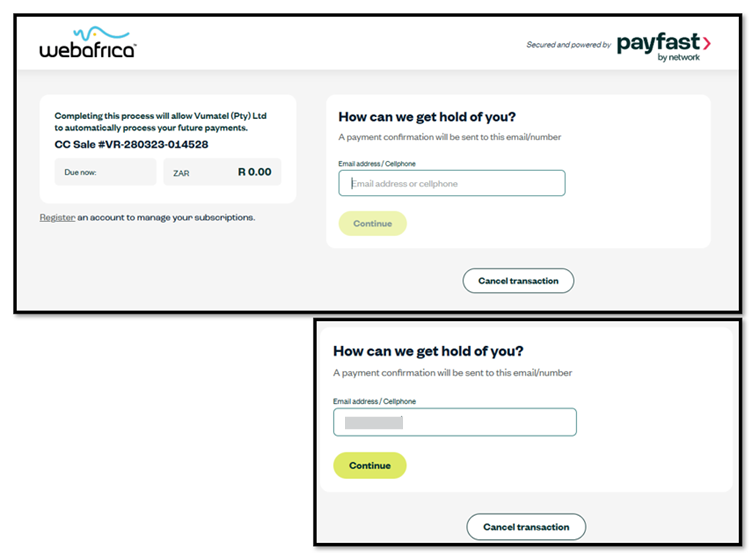
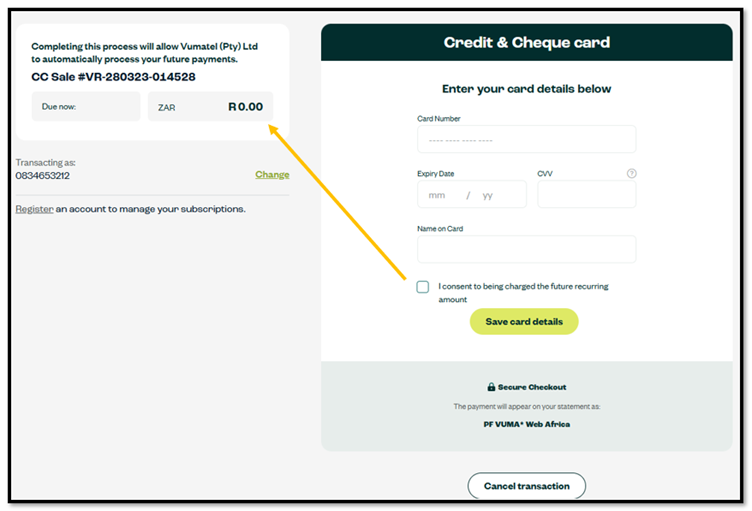
Important: When registering a new card, you’ll need to complete a R0.00 authorisation. This doesn’t charge your card. It simply verifies the card so it can be used for future recurring payments.
Retry a failed payment
If your scheduled payment didn’t go through, you can make the payment immediately.
- Go to pay.webafrica.co.za.
- Enter your registered mobile number or email address.
- Follow the secure prompts to complete your payment.
Once your payment has been processed successfully, your Vuma Reach service will reconnect automatically if it was suspended due to non-payment.
Need help?
If you’re having trouble updating your card or completing a payment, our Support Team will be happy to assist.