
Set up your Webafrica email account in Apple Mail on your Mac using IMAP. IMAP keeps your emails synced across your devices, including your Mac, phone, tablet, and Webmail.
Before You Start
- Your full email address, for example name@yourdomain.co.za
- Your email password
- An active internet connection
Step 1: Open Apple Mail
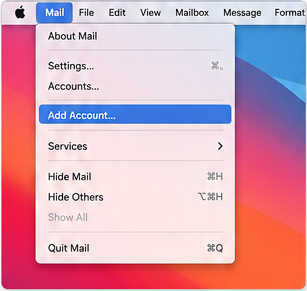
Open the Mail app on your Mac. If Mail is already set up, select Mail in the top menu and click Add Account.
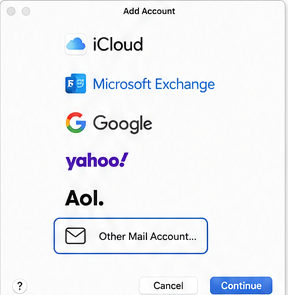
Select Other Mail Account, then click Continue.
Step 3: Enter Your Email Details
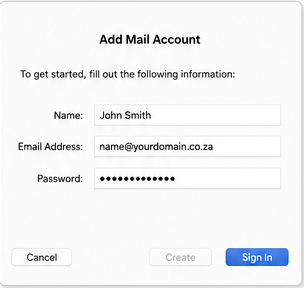
Enter your display name, full email address, and email password. Click Sign In.
Step 4: Configure Incoming Mail Server Settings
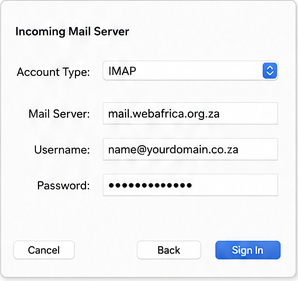
If Apple Mail cannot detect your settings automatically, enter the incoming server settings manually.
| Account Type | IMAP |
| Incoming Server | mail.webafrica.org.za |
| Username | Your full email address |
| Password | Your email password |
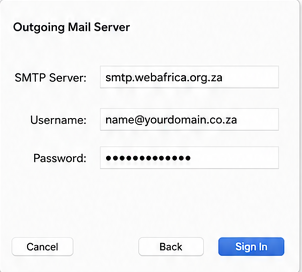
Step 5: Configure Outgoing Mail Server Settings
Enter the outgoing SMTP server settings.
| Outgoing Server | smtp.webafrica.org.za |
| Username | Your full email address |
| Password | Your email password |
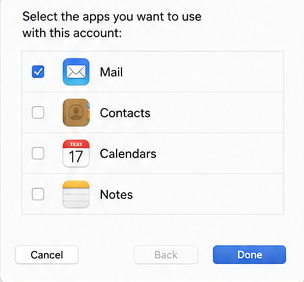
Step 6: Select Mail to Sync
Make sure Mail is selected, then click Done.
Recommended Email Settings
| Setting | Incoming IMAP | Outgoing SMTP |
|---|---|---|
| Server | mail.webafrica.org.za | smtp.webafrica.org.za |
| Port | 993 | 465 |
| Encryption | SSL/TLS | SSL/TLS |
| Username | Your full email address | Your full email address |
| Password | Your email password | Your email password |
| Authentication | Required | Required |
Troubleshooting Tips
Password Not Accepted?
- Make sure your password is entered correctly.
- Use your full email address as the username.
- Check that Caps Lock is not enabled.
Emails Are Not Sending?
- Check that the outgoing server is smtp.webafrica.org.za.
- Make sure authentication is enabled.
- Use your full email address as the username.
Emails Are Not Syncing?
Remove the account from Apple Mail and add it again using the settings above.
Why We Recommend IMAP
IMAP keeps your mailbox synced across devices. This means your inbox, sent mail, folders, and deleted items stay updated whether you use Apple Mail, your phone, or Webmail.